The Ultimate Setup Guide for Your Arctis 7X Wireless
Category: Audio
Introduction
The Arctis 7X Wireless positions itself as a versatile, comfort-focused gaming headset tailored for Xbox Series X|S and wide platform compatibility. For buyers who prioritize low-latency wireless audio, a reliable microphone for streaming or party chat, and all-day comfort, the Arctis 7X is frequently on the shortlist. This guide walks through what the Arctis 7X offers, how it performs across real-world use cases, step-by-step setup and tuning advice, a compact comparison with close alternatives, and a practical buying guide to help shoppers decide whether it meets their needs.
Detailed Product Review and Analysis
Design, fit, and comfort
The Arctis 7X continues SteelSeries' ski-goggle-style suspension headband and soft earcup approach. The design leans toward understated, with a matte plastic chassis reinforced by a metal frame where durability matters. Ear cushions use breathable fabric that aims to reduce heat during extended sessions.
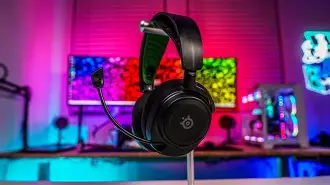
In practical terms, this translates to a headset that most users can wear for marathon gaming or long workdays without significant discomfort. Streamers and content creators who spend many hours at a desk typically appreciate the lightweight build and even pressure distribution across the head. Users with larger ears or wearing glasses should still try the fit in person if possible, but reports commonly indicate a reliable fit for a broad range of head shapes.
Audio performance and signature
Out of the box, the Arctis 7X presents a balanced sound signature with a slight emphasis on mids and controlled bass. This makes dialogue clarity—important for single-player narrative titles and voice chat—quite good while preserving enough low-end for immersion in action games. The headset also responds well to EQ adjustments via SteelSeries' software suite on PC, allowing users to tailor the signature for competitive FPS, cinematic single-player, or music listening.
For competitive gamers, the Arctis 7X provides accurate positional cues when tuned. Casual and story-driven players will likely prefer a bit more warmth in the low end, which is easily achieved with EQ presets. Audiophiles should note that while the Arctis 7X is capable and clean, it does not replace dedicated audiophile headphones paired with a high-quality DAC/amp for critical listening.
Wireless connectivity and latency
One of the Arctis 7X's main selling points is its multi-mode wireless connectivity. It supports native Xbox Wireless for easy integration with Xbox consoles and also offers Bluetooth for phone calls, music, or secondary device connections. When used with an Xbox console, the headset benefits from the low-latency profile of the Xbox Wireless protocol. For PC users, a USB-C wireless dongle (on some bundles or variants) or Xbox Wireless adapter provides a similar low-latency experience.
In everyday play, latency is effectively imperceptible for the vast majority of users, making the 7X suitable for competitive shooters and fast-paced multiplayer titles. Users who prioritize absolute minimum latency (e.g., pro-level esports competitors) may still prefer a wired solution, but for most, the wireless performance is more than sufficient.
Microphone and voice
The retractable ClearCast-style microphone on the Arctis 7X tends to be one of its standout features. It captures clear, natural voice with good background noise rejection for typical home environments. Streamers, podcasters, and squad leaders will find the mic suitable for live voice communication. The mic’s on-headset controls for mute and volume make spontaneous adjustments straightforward during matches or broadcasts.
For professional streaming or recording, many users still opt for a dedicated XLR or USB microphone to get the absolute best capture and processing control. However, for day-to-day multiplayer chat, in-game comms, and quick streaming starts, the Arctis 7X microphone performs very well.
Battery life and practical endurance
Battery life is an area buyers care about intensely. The Arctis 7X typically achieves long runtimes on a full charge—often described in manufacturer materials as up to a day of heavy use. In practical, mixed-use scenarios (gameplay plus Bluetooth media), users commonly report all-day endurance, though actual numbers will vary with volume, wireless usage modes, and whether Bluetooth is simultaneously connected.
Shop the latest Audio & Headphones picks on Amazon.
Shop Amazon →For extended sessions, it’s useful to keep a USB-C cable handy so the headset can be used while charging, avoiding interruptions during long streams or gaming marathons.
Software features
SteelSeries' software ecosystem provides EQ presets, a custom equalizer, and sometimes spatial audio features depending on platform and software updates. PC users gain the greatest control; console users should expect fewer on-device tuning options but still benefit from the headset’s hardware tuning and built-in profile.
Updating firmware through the software ensures access to incremental wireless stability improvements and any feature additions the manufacturer releases. Regular updates are recommended for longevity and improved cross-device compatibility.
Real-world use cases
- Console gamers: For Xbox players who want plug-and-play wireless performance with reliable chat functionality, the Arctis 7X integrates tightly with console workflows.
- PC gamers: Players who switch between PC and Xbox or need Bluetooth for phone calls will appreciate the multi-device connectivity.
- Streamers and content creators: Those just starting out or who stream casually will find the mic and comfort well-suited for long sessions; however, professionals often pair the Arctis with a dedicated mic for broadcast-grade sound.
- Remote workers and students: The headset doubles as a comfortable conferencing accessory with clear voice capture and long battery life.
Setup Guide — Step-by-Step
1. Initial charge and inspection
Unbox and fully charge the headset before first use. Inspect the earcups, headband, and the retractable microphone for any transit damage. A full first charge conditions the battery and reduces chance of early errors during firmware updates.
2. Firmware and software
On PC, install the SteelSeries software (often branded as SteelSeries GG) to check for firmware updates. Connect the headset to the PC or dock the wireless dongle as instructed and run the firmware updater. Firmware updates can resolve connectivity quirks and improve battery management.
3. Pairing with Xbox Series X|S
Power on the headset and enable Xbox Wireless pairing mode. On the Xbox console, navigate to the pairing section and select the headset from the devices list. Once linked, test both game audio and party chat by launching a multiplayer or party session.
4. Pairing Bluetooth for phone/media
Enable Bluetooth on the headset (usually by using a specific button sequence) and pair with a phone or tablet. Test music playback and phone call quality to confirm microphone routing and media controls work as expected.
5. PC use and software tuning
For PC, plug in the provided USB dongle or pair via Bluetooth (for non-dongle setups). Open the SteelSeries application to select presets, adjust EQ, and enable any virtual surround or spatial audio modes available. Test in a game with clear positional audio (e.g., a shooter) and adjust until spatial cues feel natural.
6. Practical tips for stability
- Keep the headset firmware current.
- Place the wireless dongle in an unobstructed USB port or a short extension to improve line-of-sight where possible.
- If experiencing interference, try disabling nearby 2.4GHz devices or switching Bluetooth off temporarily to test isolation.
- Use a charging schedule: recharge nightly or keep a USB-C cable ready for long sessions.
Pros & Cons
- Pros:
- Comfortable, breathable ear cushions suitable for extended wear
- Native Xbox Wireless support with Bluetooth multipoint for phone connectivity
- Clear, usable microphone for in-game chat and casual streaming
- Long battery life for day-long gaming sessions
- Good out-of-the-box balance with software EQ for personalization
- Cons:
- Not a substitute for audiophile-grade headphones for critical listening
- Advanced audio tuning best experienced on PC via software; console users have fewer options
- Some users may prefer a detachable mic or different build materials for premium feel
- Wireless dongle placement can matter for stability—requires attention to setup
Comparison Table
| Model | Primary Platform | Wireless Tech | Battery Life (typ.) | Microphone | Best for |
|---|---|---|---|---|---|
| Arctis 7X | Xbox Series X|S, PC | Xbox Wireless + Bluetooth | ~20–24 hours | Retractable ClearCast | Xbox gamers who want wireless freedom and phone connectivity |
| Arctis 7P | PlayStation, PC | 2.4GHz wireless + Bluetooth (varies by revision) | ~20–24 hours | Retractable ClearCast | PlayStation and multi-platform users wanting console-optimized integration |
| Arctis Nova Pro | Multi-platform | Lossless wireless options with base station (varies) | ~20–30 hours (varies) | Articulating studio-grade mic | Users seeking premium audio features and hardware mixing |
Buying Guide: What to Consider
When evaluating the Arctis 7X or similar wireless gaming headsets, buyers typically care about a consistent set of factors. Below are the most important considerations and how the Arctis 7X stacks up.
1. Platform compatibility
Buyers should confirm native support for their primary platform. The Arctis 7X is built with Xbox in mind, offering first-class integration. PC users can expect full functionality via USB dongle and SteelSeries software, while PlayStation users will find other variants or alternatives more directly tailored to their console.
Discover deals on Audio & Headphones — updated daily.
See Deals →2. Wireless reliability and latency
Low-latency wireless is important for competitive play. The Arctis 7X uses protocols that minimize lag on Xbox and, when used with a compatible dongle on PC, provides comparable performance. For users demanding the absolute minimum latency, a wired headset remains the safest choice.
3. Microphone quality
Consider whether the on-headset microphone meets communication needs. The Arctis 7X’s mic is clear and well-suited to party chat and casual streaming. Buyers who produce professional podcasts or broadcasts should plan for a dedicated microphone later.
4. Comfort and ergonomics
Comfort matters if sessions run long. The Arctis 7X rates highly for breathable ear cushions and balanced clamping force. Check headband style and earcup materials if the user often wears glasses or has sensitive ears.
5. Battery life and charging convenience
Long battery life is essential for portable use and long streams. The Arctis 7X typically supports all-day play on a full charge. Evaluate charging method (USB-C preferred), and whether the headset can be used while charging.
6. Software and customization
PC-oriented users will value robust software for EQ, firmware updates, and spatial audio. The Arctis 7X delivers the best experience when paired with SteelSeries’ software; console users should expect fewer tuning features.
7. Build quality and longevity
Inspect warranty terms and the materials used. The Arctis 7X balances plastic and metal reinforcement to keep weight down without sacrificing critical durability. Consider extended warranty or retailer protections if heavy daily use is anticipated.
8. Price and value
Value depends on how many of the headset’s strengths align with the buyer’s needs. The Arctis 7X offers a compelling set of features for console-first players who also want modern conveniences like Bluetooth. Buyers focused solely on audio fidelity or premium materials might look higher up the ladder, while budget-conscious shoppers might compare older Arctis revisions or alternative brands.
Troubleshooting & Maintenance Tips
- Keep firmware updated via the manufacturer’s software to resolve connectivity or mic issues.
- If audio dropouts occur, test with Bluetooth off to isolate interference, and try moving the USB dongle to a front or extension port.
- Clean ear cushions periodically with a gentle brush and mild cleaner to extend cushion life and hygiene.
- Store the headset in a safe location when not in use to avoid accidental drops or cable strain.
Conclusion
The Arctis 7X Wireless is a thoughtfully engineered headset for players who want a balance of comfort, platform-ready wireless performance, and useful microphone quality. It fits especially well for Xbox-first households, multi-device users who appreciate Bluetooth, and streamers seeking a comfortable, dependable daily headset. While it does not replace specialized audiophile gear or a top-tier broadcast microphone, it offers a compelling all-in-one package for most gamers and content creators. Buyers should weigh platform priorities, the need for software-driven audio tuning, and desired build premium against price to determine whether the Arctis 7X is the right long-term companion for their setup.